Server Card & discovery
A Server Card is a small JSON document a crawler, registry, or another agent
can fetch to learn what your MCP server exposes — its name, transport endpoint,
and tool list — without opening an MCP session. mcppipe serves this card
at /.well-known/mcp/server-card.json following the MCP discovery primitive
(SEP-2127).
Discovery is off by default. A private tunnel is indistinguishable from one
that does not exist: it answers discovery probes with 404. You opt in
per tunnel from Settings.
Turn discovery on
Section titled “Turn discovery on”Open a tunnel, go to the Settings tab, and find the Discovery (Server Card) section. Flip Serve Server Card publicly.
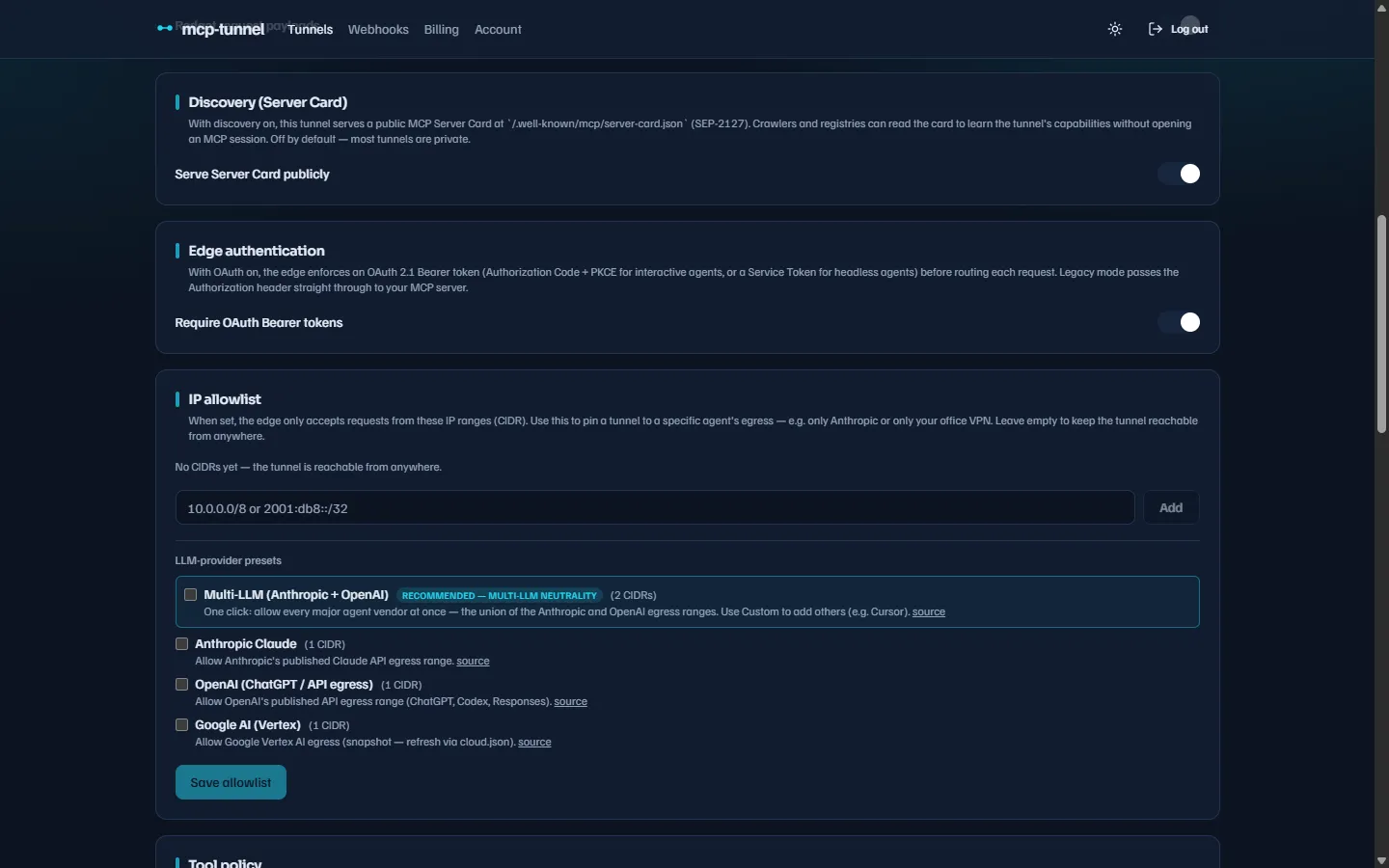 Discovery is opt-in per tunnel and defaults to off.
The toggle writes the discoverable flag on the tunnel. You can also set it
through the API:
curl -X PATCH https://api.mcppipe.dev/api/tunnels/<tunnel-id> \ -H "Authorization: Bearer <session-token>" \ -H "Content-Type: application/json" \ -d '{"discoverable": true}'When you flip it on, the dashboard confirms that
.well-known/mcp/server-card.json now serves a card; flipping it off confirms
the path returns 404 again.
Where the card is served
Section titled “Where the card is served”The card is reachable on the same public host as the tunnel:
| Path | Notes |
|---|---|
https://<subdomain>--<account-slug>.<zone>/.well-known/mcp/server-card.json | Primary path (SEP-2127). |
…/.well-known/mcp-server-card.json | Legacy alias for early crawlers; identical response. |
For example, a tunnel notes under account slug acme serves its card at
https://notes--acme.mcppipe.dev/.well-known/mcp/server-card.json. If the
tunnel has a custom domain, the card is served there too.
What the card contains
Section titled “What the card contains”The card is built entirely from the tunnel’s record and its pinned tool
names — it does not open an MCP session to render. Tool names are
captured by tool pinning every time a tools/list
flows through mcppipe, so a tunnel that has never served a tools/list
renders a valid card with an empty tools array.
{ "$schema": "https://static.modelcontextprotocol.io/schemas/draft/server-card.schema.json", "name": "io.mcppipe/notes", "title": "notes", "description": "MCP server exposed via mcppipe", "version": "1", "capabilities": { "tools": {} }, "tools": [ { "name": "echo" }, { "name": "add" } ], "remotes": [ { "type": "streamable-http", "endpoint": "https://notes--acme.mcppipe.dev/mcp" } ], "_meta": { "io.mcppipe/served-by": "mcppipe", "io.mcppipe/card-version": 1 }}Field notes:
name— reverse-DNS-style identifier. For a default subdomain it isio.mcppipe/<subdomain-label>; for a custom domain it isio.mcppipe/<fqdn>.remotes[].endpoint— the/mcpURL of this tunnel, advertised with transport typestreamable-http.tools[]—{ "name": ... }objects only. Tool descriptions and schemas are never published in the card (only names are pinned), which keeps the discovery surface minimal._meta— marks the card as mcppipe-hosted so a reader can identify it without parsing thenameprefix.
Response headers
Section titled “Response headers”A successful card response is 200 OK with:
| Header | Value |
|---|---|
Content-Type | application/json |
Cache-Control | public, max-age=600 (10 minutes) |
Access-Control-Allow-Origin | * (so a browser-side discovery UI can fetch it directly) |
X-Content-Type-Options | nosniff |
The 10-minute cache means a freshly-pinned tool will appear in the card within a few minutes, while keeping crawlers from hammering the service.
What discovery does not expose
Section titled “What discovery does not expose”The card endpoint is observation, not traffic, so the traffic gates do not apply to it. It is exempt from the per-tunnel tool policy, per-method/per-tool rate limits, IP allowlist, and quota — and it does not require an OAuth bearer token, even when the tunnel’s MCP endpoint does. The card never carries request payloads, so none of those checks are meaningful for it.
Rendering the card is cheap — it reads only the tunnel’s record and its pinned
tool names, and never wakes a sleeping CLI or opens an MCP session. Because
the card is built from a stored snapshot, hitting .well-known cannot be used
to force an upstream connection.
Behavior summary
Section titled “Behavior summary”| Request | Response |
|---|---|
| Discoverable tunnel | 200 with the card JSON |
| Tunnel exists but not discoverable | 404 — identical to “no tunnel” |
| No tunnel matches the host | 404 |
| Host resolver unavailable | 502 Bad Gateway |
Next steps
Section titled “Next steps”- Tool governance — how tools get pinned, and allow/deny policy.
- Authentication: OAuth & Service Tokens — gate the
/mcpendpoint itself. - Custom domains & TLS — serve the card on your own FQDN.
- Dashboard reference — the full list of tunnel Settings sections.